
The Recycle Bin icon looks like a wastebasket or trash bin. It appears on the desktop because it is used quite frequently. It is the receptacle for the files that you delete, the same as the wastebasket beside your desk is where you throw papers away. Just like your physical wastebasket, where you can retrieve objects before they are permanently thrown away, the Recycle Bin allows you to "undelete" items that have been thrown away.
It is best to think of the Recycle Bin as a place where your files are stored before they are permanently deleted. Few people think of it as a storage area, but it really is. If you adopt this understanding, then you can more efficiently use your system by managing how the Recycle Bin is used. (See Figure 1.)
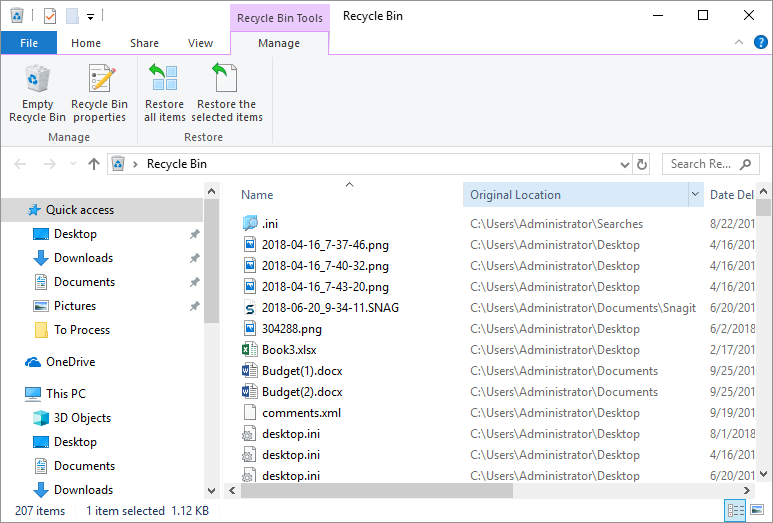
Figure 1. The Recycle Bin is used to store items you want to delete.
If you open the Recycle Bin (by double-clicking on its icon), you'll notice that it looks like any file listing in any other Windows folder. You can place an item in the Recycle Bin in a couple of ways. The most direct method is to select the object that you want to delete (place in the Recycle Bin) and then press the Del key. You can also use the mouse to drag the object to the Recycle Bin.
Items stay in the Recycle Bin until you explicitly delete them (use the Empty Recycle Bin) link at the top of the Recycle Bin dialog box) or until the aggregate size of the files in the Recycle Bin start approaching the amount of space you have allocated to the Recycle Bin. When that occurs, then Windows automatically deletes the oldest items in the Recycle Bin in order to free up room on the drive. (You can learn more about how to change the size of the Recycle Bin in another WindowsTip.)


 This tip (10863) applies to Windows 7, 8, and 10.
Placing something in the Recycle Bin does not mean it is gone forever. After placing something there, you may change your ...
Discover MoreThe Recycle Bin is a great feature that allows you to recover files that you didn't intend to delete. But you may find ...
Discover MoreOver time our computers can become bogged down by items in the Recycle Bin or by temporary files. To help free up space ...
Discover More2026-03-21 04:57:50
sandeepkothari
How to programitically through vba macro delete the items in the Recycle Bin?
Copyright © 2026 Sharon Parq Associates, Inc.

Comments